Using Cloe Launch
In the previous section we learned about Conan’s virtual environment generator,
and how this can be used to run cloe-engine. Conan’s virtual run
environment is great, but it is an extra step that needs to be executed, and
there are some edge cases where it doesn’t work. Additionally, using it
requires modifying your shell environment, which might be a problem for those
who don’t want to add extra items to their PATH variable.
This is why Cloe comes with a command line wrapper for executing cloe-engine
in a virtual run environment that doesn’t affect your current shell. This tool
is called cloe-launch and can be installed with pip or pipx.
Installation
You can install cloe-launch by running the following from the repository
root directory:
$ make deploy-cli
You can also use one of the targets directly from the cli/ directly, in
case you want to install an editable version of cloe-launch.
Usage
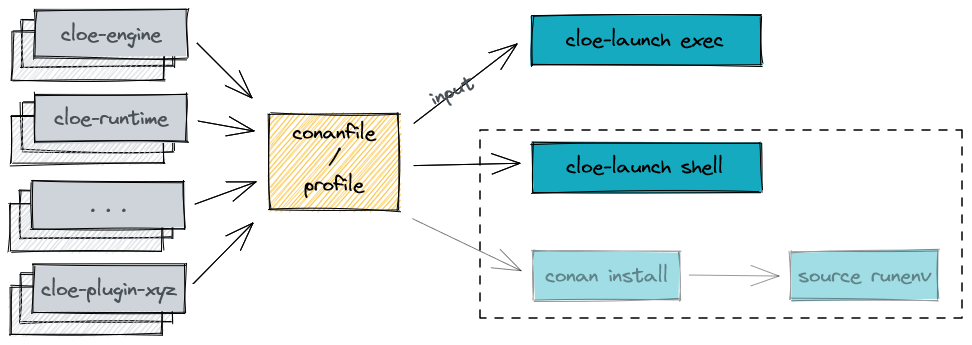
Let us recap the steps required to run cloe-engine with Conan:
Create Conan virtual run environment in temporary directory.
Create a new sub shell.
Source virtual run environment activate script.
Run
cloe-enginewith required arguments.Remove temporary directory.
Exit sub shell.
Exec Command
The steps 1-6 can be performed as one with the cloe-launch exec command:
Run
cloe-launch execwith the input conanfile and specifycloe-enginearguments after--.
For example:
$ cloe-launch exec tests/default_profile.py -- run tests/config_nop_smoketest.json
{
  "elapsed": "17.837523ms",
  "outcome": "success",
  "simulation": {
    "achievable_realtime_factor": 4046.944556859571,
    "eta": {
      "ms": 60000,
      "str": "60s"
    },
    "realtime_factor": -1.0,
    "step": 3000,
    "step_width": "20ms",
    "time": {
      "ms": 60000,
      "str": "60s"
    }
  },
  [... snip ...]
}
The -- argument
The -- separates cloe-launch arguments and options from those that should
be passed directly to conan or cloe-engine. If you want to see the cloe-engine
help for example, you would need to run:
$ cloe-launch exec tests/default_profile.py -- --help
If you omit the -- part, the flag will be passed to conan install.
Shell Command
The steps 1-3 and 5 can be performed with the cloe-launch shell command.
Run
cloe-launch shellwith the input conanfile.Run
cloe-enginewith the required arguments.
If you pass any further arguments to the shell command (after specifying
--), cloe-launch will append these to the shell execution. For most shells,
-c will run the following argument in the shell environment instead of
launching a new shell. This can be useful for accessing environment variables
that would be defined in the runtime shell:
$ cloe-launch shell tests/conanfile_default.py -o cloe:with_vtd=True -- -c '${VTD_LAUNCH} --help'
Activate Command
If you want to modify your current shell instead of creating a new one, you can
use the activate command:
$ cloe-launch activate tests/conanfile_default.py
# Please see `cloe-launch activate --help` before activating this.

source ~/.cache/cloe/launcher/7745ffb0e036192c8e29a8b8cc2b9571e7a72c8c/activate_all.sh
source ~/.cache/cloe/launcher/7745ffb0e036192c8e29a8b8cc2b9571e7a72c8c/prompt.sh
You can then use the source feature of your shell to integrate these
commands:
$ source <(cloe-launch activate tests/conanfile_default.py)
Or use the eval command:
$ eval $(cloe-launch activate tests/conanfile_default.py)
Prepare Command
The other commands we’ve seen so far only print output once they are done, and in addition they by default don’t build any missing or outdated packages. They also always want to do something after calling Conan, such as start a shell or run a command.
The prepare command is for the use-case where all you want to do is prepare
the virtual runtime environment, and you want to see the Conan output without
interference or delay:
$ cloe-launch prepare tests/conanfile_default.py
This is used by the make target smoketest-deps, which just prepares all
the virtual environments, which might take some time in case any packages need
to be built.
Runtime Cache
When you run even a simple command, such as cloe-launch exec -- usage,
you will notice that there is still a significant delay until cloe-engine is
run. You can minimize this by instructing cloe-launch to re-use the cache
with the -c argument. The cache contains the virtual run env based on the
profile hash, but it may be out-of-date, which is why it’s not on by default.
If you provide any (different) options to the Conan install command, these will not take effect if you re-use the cache.
You can use this cache for the exec, shell, and activate commands.
Conan Options
Under the hood, cloe-launch uses Conan to do a lot of the heavy lifting,
in particular it uses the conan install command with the VirtualRunEnv
generator and the conanfile you specify.
This install command accepts a whole host of options, which you can see
with conan install --help.
Any cloe-launch command that takes a conanfile will also take conan options.
These are all arguments that follow the conanfile positional arguments
up until the first -- encountered.
For example, to instruct Conan to build any missing dependencies:
$ cloe-launch exec tests/conanfile_default.py -o cloe:with_vtd=True --build=missing -- usage
(This is somewhat contrived example, since it’s preferable to use the
prepare command for this use-case. But it goes to show you don’t need to.)
Note
The hash used for the cache is not dependent on these options, so if you specify any Conan options, you probably should not re-use the cache, or make sure you clean the cache before the first invocation.
A plausible usage example is:
cloe-launch prepare tests/conanfile_default.py -o cloe-engine:server=False
The option -o cloe-engine:server=False tells Conan to change
the default option server of the cloe-engine package to False. This instructs
Conan to use a different package, and because it’s not built by default, the
--build=missing tells Conan to build the package if it’s missing.
This is a plausible call to make, since cloe-launch doesn’t build missing packages by default (to avoid unintentionally running something you didn’t want to run).
Note
Which options you use where should be more clear now: Conan options are for selecting and configuring Conan packages, which might include your own packages. You might want to use a debug build, for example. As a rule of thumb, if you don’t know what options are available, you probably don’t use Conan enough to need them. You can see them by running
conan install --help.
Getting Help
Once cloe-launch is available in your PATH, you can get help from the tool
itself anytime with the --help flag:
$ cloe-launch --help
Usage: cloe-launch [OPTIONS] COMMAND [ARGS]...

  Launch cloe-engine with profiles and manage launch profiles.

Options:
  -v, --verbose  Print more information (mostly debugging).
  --help         Show this message and exit.

Commands:
  activate  Launch shell with the correct environment from a profile.
  clean     Clean launcher profile cache.
  exec      Launch cloe-engine with a profile.
  prepare   Prepare environment for selected profile.
  profile   Manage launcher profiles.
  shell     Launch shell with the correct environment from a profile.
Troubleshooting
When you get an error from running cloe-launch, it’s important you read the
output to understand where the problem is. Usually, errors will come from
Conan, which is used under-the-hood.
In this case, you might see in the first few lines:
$ cloe-launch exec tests/conanfile_default.py -- check tests/test_minimator_smoketest.json
Error running: conan install --install-folder /home/captain/.cache/cloe/launcher/167cfb520dd89cc6124d02369b3ae77632f7b6c8 -g virtualenv tests/conanfile_default.py
Configuration:
[settings]
arch=x86_64
[... snip ...]
This tells us with which command the problem occurred. If we continue reading the output looking for any error statements, we might find something:
[... snip ...]
cloe/0.18.0@cloe/develop: Not found in local cache, looking in remotes...
cloe/0.18.0@cloe/develop: Trying with 'artifactory'...
cloe/0.18.0@cloe/develop: Trying with 'conan-center'...
ERROR: Failed requirement 'cloe/0.18.0@cloe/develop' from 'tests/conanfile_default.py (cloe-test/0.18.0)'
ERROR: Unable to find 'cloe/0.18.0@cloe/develop' in remotes
[... snip ...]
Here we find the actual source of the problem: The cloe package, which is
referred to in the conanfile we used (tests/conanfile_default.py), cannot be found. This
usually means you haven’t built it yet, and can be dealt with the process
described in Installation.
This is then followed by a Python traceback, which is less helpful at first glance:
[... snip ...]
Traceback (most recent call last):
  File "/home/captain/.local/bin/cloe-launch", line 8, in <module>
    sys.exit(entry_point())
  File "/home/captain/.local/pipx/venvs/cloe-launch/lib/python3.6/site-packages/cloe_launch/__main__.py", line 446, in entry_point
    main()
  File "/home/captain/.local/pipx/venvs/cloe-launch/lib/python3.6/site-packages/click/core.py", line 829, in __call__
    return self.main(*args, **kwargs)
  File "/home/captain/.local/pipx/venvs/cloe-launch/lib/python3.6/site-packages/click/core.py", line 782, in main
    rv = self.invoke(ctx)
  File "/home/captain/.local/pipx/venvs/cloe-launch/lib/python3.6/site-packages/click/core.py", line 1259, in invoke
    return _process_result(sub_ctx.command.invoke(sub_ctx))
  File "/home/captain/.local/pipx/venvs/cloe-launch/lib/python3.6/site-packages/click/core.py", line 1066, in invoke
    return ctx.invoke(self.callback, **ctx.params)
  File "/home/captain/.local/pipx/venvs/cloe-launch/lib/python3.6/site-packages/click/core.py", line 610, in invoke
    return callback(*args, **kwargs)
  File "/home/captain/.local/pipx/venvs/cloe-launch/lib/python3.6/site-packages/click/decorators.py", line 33, in new_func
    return f(get_current_context().obj, *args, **kwargs)
  File "/home/captain/.local/pipx/venvs/cloe-launch/lib/python3.6/site-packages/cloe_launch/__main__.py", line 219, in cli_exec
    engine_args, use_cache=cache, debug=debug, override_env=overrides
  File "/home/captain/.local/pipx/venvs/cloe-launch/lib/python3.6/site-packages/cloe_launch/exec.py", line 603, in exec
    env = self._prepare_runtime_env(use_cache)
  File "/home/captain/.local/pipx/venvs/cloe-launch/lib/python3.6/site-packages/cloe_launch/exec.py", line 458, in _prepare_runtime_env
    self._prepare_virtualenv()
  File "/home/captain/.local/pipx/venvs/cloe-launch/lib/python3.6/site-packages/cloe_launch/exec.py", line 412, in _prepare_virtualenv
    self._run_cmd(conan_cmd, must_succeed=True)
  File "/home/captain/.local/pipx/venvs/cloe-launch/lib/python3.6/site-packages/cloe_launch/exec.py", line 639, in _run_cmd
    return run_cmd(cmd, must_succeed=must_succeed)
  File "/home/captain/.local/pipx/venvs/cloe-launch/lib/python3.6/site-packages/cloe_launch/utility.py", line 29, in run_cmd
    raise ChildProcessError()
ChildProcessError
The Python trace is useful for developing cloe-launch and for reporting
bugs, as it lets us find the point in the code where the exception occurred and
was handled.
Note
For many errors, there may not be any Python traceback. That usually indicates that the problem is a user error. Which errors cause tracebacks and which do not may be changed in future versions of
cloe-launch.
Suggested Exercises
- Install cloe-launch locally and view the help.(Hint: Have a look at the
cli/Makefilefile in the repository.) - Create a simple profile to be used with cloe-launch.(Hint: See Understanding Cloe Packages for help on creating a
conanfile.txt) - Run the cloe-engine
usagecommand with the help of cloe-launch.(Hint: Use theexeccommand.) - Use the global
-vvargument for several cloe-launch commands.Do you understand the value of the information you now see?(Hint: This needs to be provided before the command you want to execute, for example:cloe-launch -vv exec.) - Find the cloe-launch cache location for your default profile.Do you recognize the contents?(Hint: See the output of the commands when you increase verbosity.)